Review carrier tenancy
Keep agreements connected to the site and structure. Review rent, term dates and payment history alongside the carrier’s lease records.
For tower owners and companies that lease space to carriers
The Tower Company Dashboard is our most sophisticated public offering, designed for the breadth of work involved in owning and operating a tower portfolio.
Connect sites, structures, carrier tenancies, equipment, agreements and financial records. Follow the detail behind each tower while keeping the wider portfolio in view.
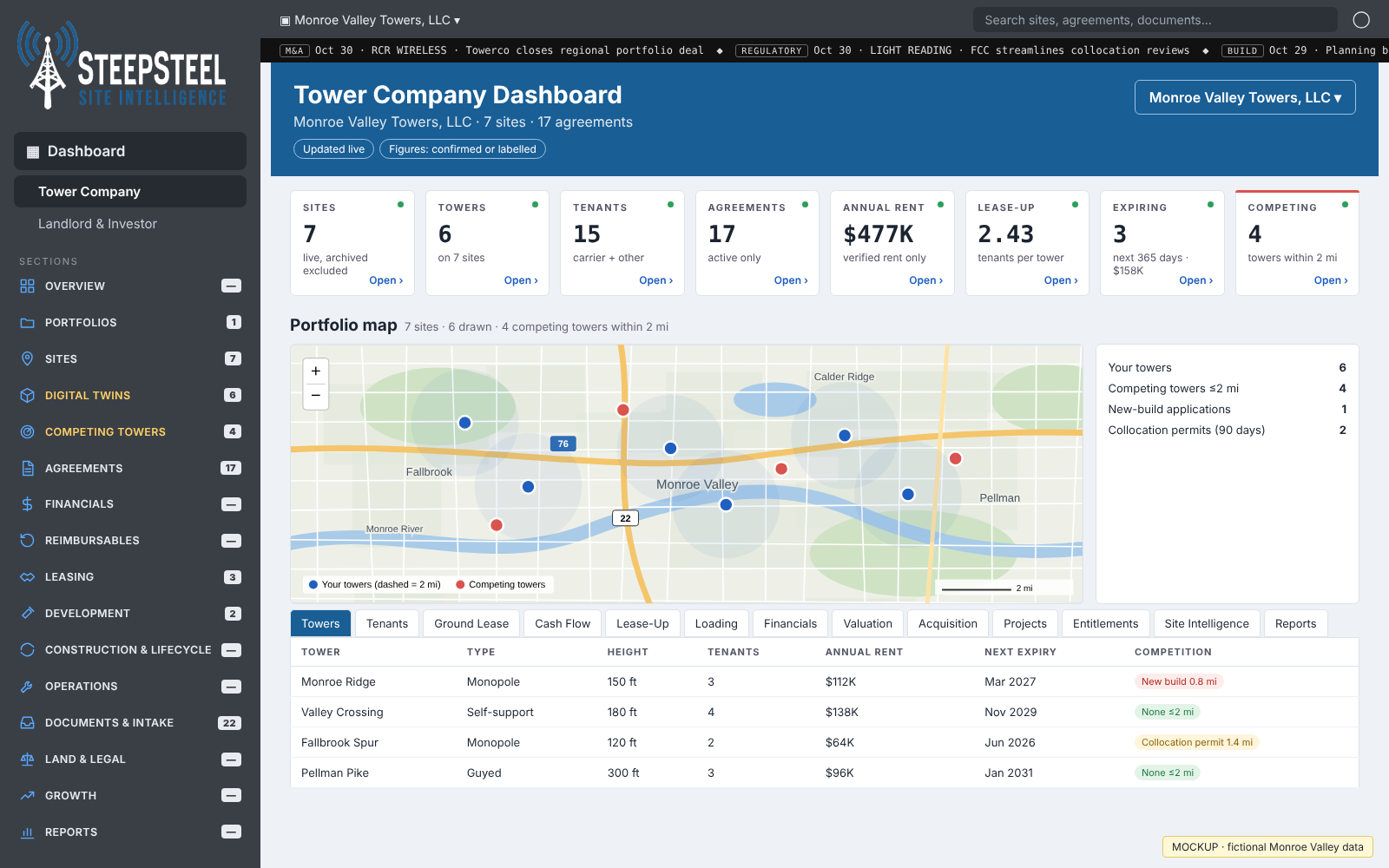
Preview only—not a production version. Design and features are subject to change.
View full size ↗A carrier amendment can affect the equipment record, occupied tower space and rent. Site Intelligence helps you follow those connections.
Keep agreements connected to the site and structure. Review rent, term dates and payment history alongside the carrier’s lease records.
Review antennas, radios and lines by carrier and mount height. Compare equipment counts, dimensions and occupied space with the agreement and exhibits.
See the stage and next action for negotiations and amendments. Keep the supporting agreement available when reviewing a proposed change.
Digital twins
Traditional digital-twin features model the compound, the tower and the equipment installed on it—giving the physical site a place alongside its commercial records.
We’re developing the ability for tower companies to make changes directly in the digital twin, including adding equipment and modifying the model as they work.
This editing capability is planned and is not yet available in production. Its design and features are subject to change.
A shared view of the work
Review carrier terms, upcoming expirations and negotiations with source records available.
Compare rent and other lease-based charges with the payments recorded.
Consult structure details, equipment records, loading analyses and inspection records on file.
An illustrative review question
Review the existing equipment schedule, mounting positions and applicable lease terms. Follow the amendment through its recorded stages and compare the updated terms with subsequent payments.
The agreement and supporting records guide the review.
Getting started
Carrier leases and amendments, equipment schedules, site drawings, structural and inspection records on file, and payment history.
SteepSteel reviews the records, connects the lease terms to their sources, and checks the payment history. Your team reviews a portfolio with the questions and supporting detail in view.
See the four-step process →It is in development. The planned capability will let tower companies modify the model and add equipment as they work. It is not yet a production feature, and no release date is being announced.
No. The portfolio can bring together loading analyses and inspection records. Engineering conclusions and approvals require the appropriate professional review.
The live product tour includes site records, structure records and equipment records, with agreements and finance views alongside them.
Stay in touch
Register your interest and tell us a little about your portfolio. We’ll follow up with more information and next steps.